Overview
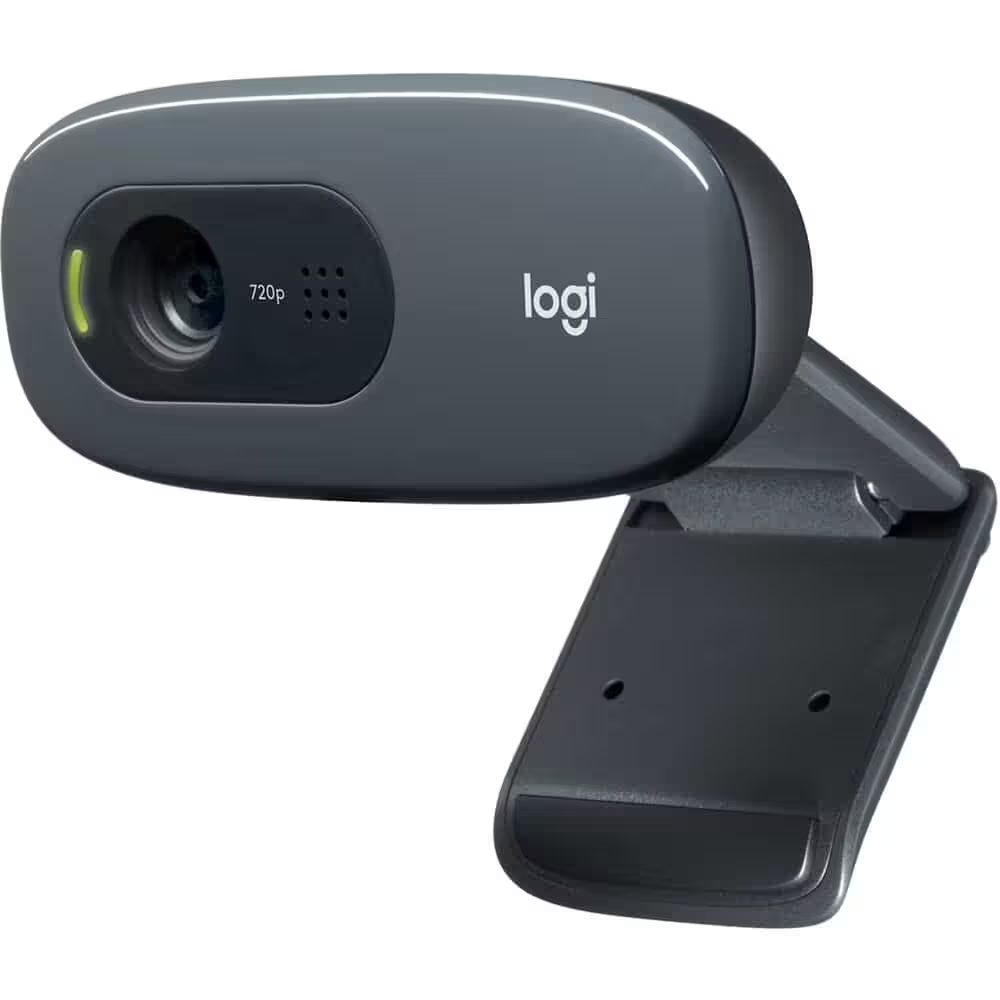
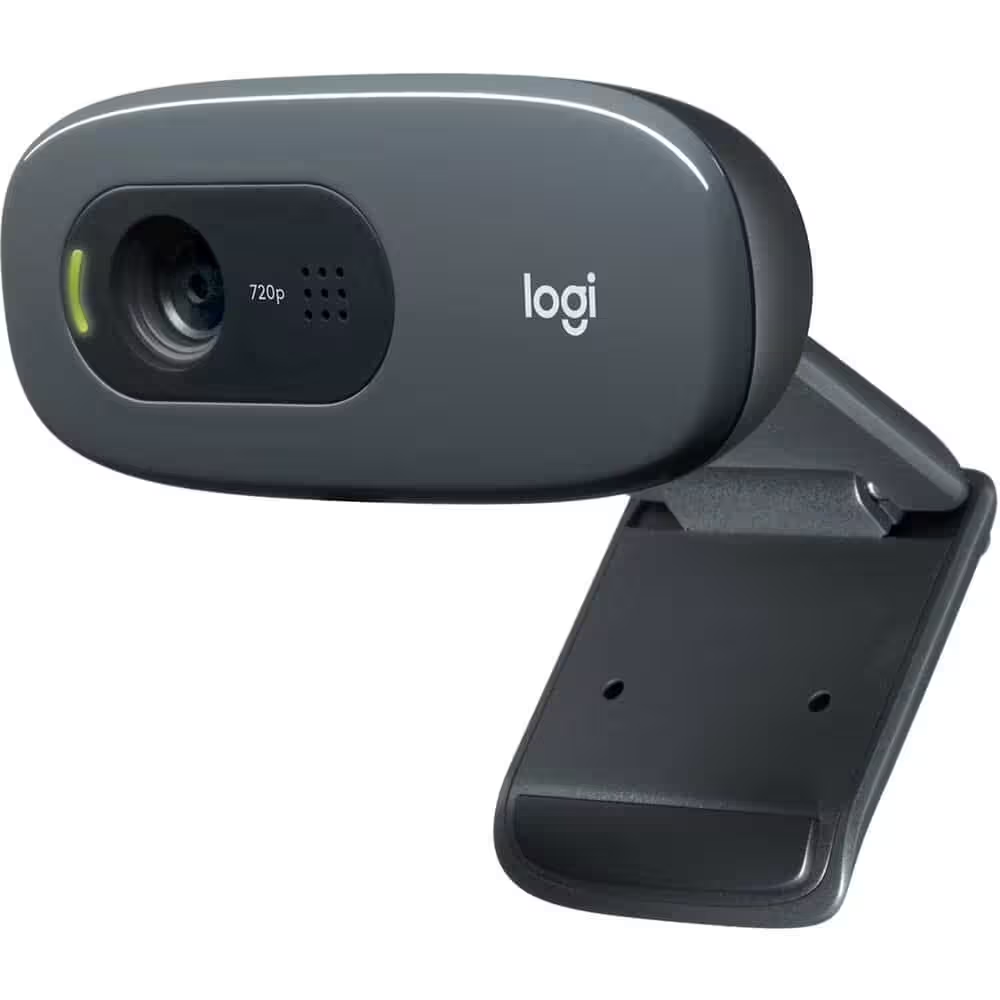
The Logitech C270 HD Webcam – 720p Widescreen Video Calling with Mic Black — 720p video at 30fps, 55° field of view, fixed focus lens optimised for 0.1–5m, dual noise-reducing omnidirectional microphones, USB 2.0 plug-and-play. Compatible with Windows, macOS and Linux. Approximately 75g. Black.
✓ 720p HD at 30fps · 55° field of view · fixed focus optimised for 0.1–5m desk range
✓ Dual noise-reducing omnidirectional microphones · hands-free calls and voice input
✓ USB 2.0 plug-and-play — no driver installation · Windows, macOS, Linux
✓ Universal clip — fits flat monitors, laptop screens and shelves · ~75g
The Logitech C270 is Logitech's entry-level HD webcam — a straightforward 720p USB webcam designed for video calling, online classes, remote work and casual streaming where the priority is reliable plug-and-play functionality at a compact size and modest price. The C270i delivers 1280×720 HD video at 30 frames per second through a fixed-focus lens calibrated for the 0.1–5 metre working range that covers standard desk and monitor positions. Fixed focus means the lens is set at the factory for clear capture in this distance range without the camera needing to hunt for focus during use — a practical advantage for calls where a small subject movement might cause an autofocus system to briefly defocus. The dual noise-reducing omnidirectional microphones captures voice for calls without requiring a separate headset or microphone. USB 2.0 plug-and-play: connect to any USB-A port on Windows, macOS or Linux and the camera is immediately available as a video input device — no driver download or software installation required. The universal clip fits flat panel monitors, laptop lids and can stand on a shelf or desk. Zoom, Microsoft Teams, Google Meet and all standard video conferencing platforms recognise the C270i immediately on connection.
720p · Fixed Focus · 55° FOV
Video Specs for Everyday Calls
The C270i captures at 1280×720 pixels — HD resolution that is a substantial improvement over the VGA (640×480) built-in cameras found in many older laptops and the lowest-tier webcams. At 30fps, video is smooth and natural for face-to-face calling. The 55° diagonal field of view is calibrated for a single user at standard desk distance — it shows the face, upper body and a moderate band of background without the perspective distortion that wider angle lenses introduce at close range. Fixed focus at 0.1–5m is the appropriate optical design for a webcam used at a desk: the camera is factory-set to be sharp across this entire range, which means it is in focus from the moment it is connected without any focus hunting or adjustment delay. The focus will not drift during a call when the user moves slightly. The C270i does not include RightLight or automatic exposure correction — lighting conditions affect the image quality directly, and users in poorly lit rooms or with bright backgrounds will see the effect in the video output. For best results, face toward a light source (window or lamp in front rather than behind). MJPEG and YUY2 output formats ensure compatibility with all standard video capture and conferencing software.
Built-In Mic · Plug-and-Play
Ready in Seconds, No Setup
The dual noise-reducing omnidirectional microphones captures audio from all directions around the webcam — voice from the front, at the typical call distance of 60–80cm from monitor height. The microphone is a single-channel mono unit, which is standard for entry-level webcams. It provides adequate voice clarity for standard video calls in quiet-to-moderate room environments. In noisy rooms or open-plan offices, a headset microphone will perform better as it captures voice from a much shorter distance. The USB 2.0 connection uses the USB Audio Class and USB Video Class standards, which are built into Windows 7 and later, macOS 10.7 and later, and most Linux distributions — no manufacturer driver download is required, and no Logitech software needs to be installed for basic camera and microphone operation. The camera appears immediately in the system as a standard webcam and USB audio input device. Logitech's optional Capture software and G HUB provide additional controls (zoom, brightness, contrast) but are not required for use. The universal clip mechanism on the base of the C270i adjusts to grip flat panel monitor tops, laptop lids, and desktop monitors of different thicknesses. The camera can also be placed on a flat surface facing forward.
C270 vs C920e · Choosing the Right Level
720p Entry-Level vs 1080p Business
The C270 sits at the entry level of Logitech's webcam range and is the most widely deployed budget USB webcam in education and home office settings globally. Its combination of 720p HD video, noise-reducing dual microphones and RightLight 2 automatic exposure correction covers the requirements of most everyday video call users — anyone upgrading from a built-in laptop camera will notice an immediate improvement in both video
✓ 720p HD at 30fps · 55° field of view · fixed focus optimised for 0.1–5m desk range
✓ Dual noise-reducing omnidirectional microphones · hands-free calls and voice input
✓ USB 2.0 plug-and-play — no driver installation · Windows, macOS, Linux
✓ Universal clip — fits flat monitors, laptop screens and shelves · ~75g
The Logitech C270 is Logitech's entry-level HD webcam — a straightforward 720p USB webcam designed for video calling, online classes, remote work and casual streaming where the priority is reliable plug-and-play functionality at a compact size and modest price. The C270i delivers 1280×720 HD video at 30 frames per second through a fixed-focus lens calibrated for the 0.1–5 metre working range that covers standard desk and monitor positions. Fixed focus means the lens is set at the factory for clear capture in this distance range without the camera needing to hunt for focus during use — a practical advantage for calls where a small subject movement might cause an autofocus system to briefly defocus. The dual noise-reducing omnidirectional microphones captures voice for calls without requiring a separate headset or microphone. USB 2.0 plug-and-play: connect to any USB-A port on Windows, macOS or Linux and the camera is immediately available as a video input device — no driver download or software installation required. The universal clip fits flat panel monitors, laptop lids and can stand on a shelf or desk. Zoom, Microsoft Teams, Google Meet and all standard video conferencing platforms recognise the C270i immediately on connection.
720p · Fixed Focus · 55° FOV
Video Specs for Everyday Calls
The C270i captures at 1280×720 pixels — HD resolution that is a substantial improvement over the VGA (640×480) built-in cameras found in many older laptops and the lowest-tier webcams. At 30fps, video is smooth and natural for face-to-face calling. The 55° diagonal field of view is calibrated for a single user at standard desk distance — it shows the face, upper body and a moderate band of background without the perspective distortion that wider angle lenses introduce at close range. Fixed focus at 0.1–5m is the appropriate optical design for a webcam used at a desk: the camera is factory-set to be sharp across this entire range, which means it is in focus from the moment it is connected without any focus hunting or adjustment delay. The focus will not drift during a call when the user moves slightly. The C270i does not include RightLight or automatic exposure correction — lighting conditions affect the image quality directly, and users in poorly lit rooms or with bright backgrounds will see the effect in the video output. For best results, face toward a light source (window or lamp in front rather than behind). MJPEG and YUY2 output formats ensure compatibility with all standard video capture and conferencing software.
Built-In Mic · Plug-and-Play
Ready in Seconds, No Setup
The dual noise-reducing omnidirectional microphones captures audio from all directions around the webcam — voice from the front, at the typical call distance of 60–80cm from monitor height. The microphone is a single-channel mono unit, which is standard for entry-level webcams. It provides adequate voice clarity for standard video calls in quiet-to-moderate room environments. In noisy rooms or open-plan offices, a headset microphone will perform better as it captures voice from a much shorter distance. The USB 2.0 connection uses the USB Audio Class and USB Video Class standards, which are built into Windows 7 and later, macOS 10.7 and later, and most Linux distributions — no manufacturer driver download is required, and no Logitech software needs to be installed for basic camera and microphone operation. The camera appears immediately in the system as a standard webcam and USB audio input device. Logitech's optional Capture software and G HUB provide additional controls (zoom, brightness, contrast) but are not required for use. The universal clip mechanism on the base of the C270i adjusts to grip flat panel monitor tops, laptop lids, and desktop monitors of different thicknesses. The camera can also be placed on a flat surface facing forward.
C270 vs C920e · Choosing the Right Level
720p Entry-Level vs 1080p Business
The C270 sits at the entry level of Logitech's webcam range and is the most widely deployed budget USB webcam in education and home office settings globally. Its combination of 720p HD video, noise-reducing dual microphones and RightLight 2 automatic exposure correction covers the requirements of most everyday video call users — anyone upgrading from a built-in laptop camera will notice an immediate improvement in both video
Read More
Gallery
Description
Logitech C270 HD Webcam – 720p Widescreen Video Calling with Mic Black
Stay connected with crystal-clear visuals using the Logitech C270 HD Webcam. Designed for reliable and smooth video calling, this webcam captures 720p HD video in a widescreen 16:9 format. It features a built-in noise-reducing microphone for natural voice quality—even in busy environments.
Thanks to Logitech’s RightLight™ technology, the C270 adjusts to various lighting conditions to present you in your best light. It is perfect for Zoom, Skype, Teams, and Google Meet on both Windows and macOS systems.
The webcam easily mounts to laptops, monitors, or tripods with its universal clip. It is plug-and-play via USB—no drivers or configuration are required.
Key Features
ResolutionHD 720p (1280 x 720)
Field of View60° – Widescreen Format
MicrophoneBuilt-in Noise-Reducing Mono Mic
Lighting AdjustmentRightLight™ Technology
ColourBlack / Dark Grey
Item Specifics
BrandLogitech
ModelC270
TypeHD USB Webcam with Microphone
ColourBlack / Dark Grey
ConnectionUSB-A Plug & Play
Compatible With
Operating SystemsWindows 10/11, macOS, ChromeOS
ApplicationsZoom, Skype, Google Meet, Teams, Discord
Mounting OptionsUniversal Clip for Monitor/Laptop
Cable Length1.5 metres approx.
Technical Specifications
Resolution1280 x 720 (30fps)
Focus TypeFixed Focus
Microphone TypeNoise-Reducing Mono Mic
Software SupportLogiTune, Webcam Settings (Optional)
FAQ – Frequently Asked Questions
Q: Is the Logitech C270 plug-and-play?
Yes, no drivers required for Windows/macOS—just plug it in.
Q: Does it have a built-in microphone?
Yes, it features a noise-reducing mono mic.
Q: Can I mount it on my laptop?
Yes, it includes a universal clip for laptops or monitors.
Q: Does it support 1080p?
No, it supports 720p HD at 30fps resolution.
Stay connected with crystal-clear visuals using the Logitech C270 HD Webcam. Designed for reliable and smooth video calling, this webcam captures 720p HD video in a widescreen 16:9 format. It features a built-in noise-reducing microphone for natural voice quality—even in busy environments.
Thanks to Logitech’s RightLight™ technology, the C270 adjusts to various lighting conditions to present you in your best light. It is perfect for Zoom, Skype, Teams, and Google Meet on both Windows and macOS systems.
The webcam easily mounts to laptops, monitors, or tripods with its universal clip. It is plug-and-play via USB—no drivers or configuration are required.
Key Features
ResolutionHD 720p (1280 x 720)
Field of View60° – Widescreen Format
MicrophoneBuilt-in Noise-Reducing Mono Mic
Lighting AdjustmentRightLight™ Technology
ColourBlack / Dark Grey
Item Specifics
BrandLogitech
ModelC270
TypeHD USB Webcam with Microphone
ColourBlack / Dark Grey
ConnectionUSB-A Plug & Play
Compatible With
Operating SystemsWindows 10/11, macOS, ChromeOS
ApplicationsZoom, Skype, Google Meet, Teams, Discord
Mounting OptionsUniversal Clip for Monitor/Laptop
Cable Length1.5 metres approx.
Technical Specifications
Resolution1280 x 720 (30fps)
Focus TypeFixed Focus
Microphone TypeNoise-Reducing Mono Mic
Software SupportLogiTune, Webcam Settings (Optional)
FAQ – Frequently Asked Questions
Q: Is the Logitech C270 plug-and-play?
Yes, no drivers required for Windows/macOS—just plug it in.
Q: Does it have a built-in microphone?
Yes, it features a noise-reducing mono mic.
Q: Can I mount it on my laptop?
Yes, it includes a universal clip for laptops or monitors.
Q: Does it support 1080p?
No, it supports 720p HD at 30fps resolution.
Recently Viewed
Items you have recently viewed.